



Bhupinder (Boo) Dhaliwale
Omnipod 5 : Automated Insulin Pump
Omnipod 5 is the first tubeless, wearable and automated insulin system (Smart Adjust technology) delivers the insulin up to 72 hours. It is integrated with continuous glucose monitoring systems such as Dexcom G6 Sensor or Freestyle Libre 2 sensor to provide real time glucose data to the users. The controller adjusts the insulin doses based on the glucose readings. The pod is waterproof, and hybrid closed loop system designed for anyone who is above 2 years having type1 diabetes.
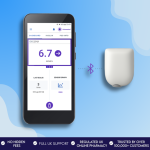
Omnipod 5 : Automated Insulin Pump
£0
Total
Price Comparison
Select your preferred options and see the best price
| Pack | Price (£) |
|---|
It looks like you missed filling in questions from the last consultation.Click Here to submit your response.
Notify me once available
Enter your email to get notified
Out of Stock

No subscriptions or hidden fees

Secure checkout

UK Regulated online pharmacy

Trusted by over 250,000+ happy customers
How does Omnipod 5 works?
In automated insulin delivery (AID) systems like the Omnipod 5, the amount of insulin is delivered based on your blood sugar levels. Every 5 minutes, it looks at your current blood sugar and predicts where it will be in the next hour. It then adjusts the insulin either increasing, decreasing, or stopping it depending on real-time sensor glucose readings.SmartAdjust™ technology uses these glucose data to manage insulin delivery all the time. It allows the Omnipod 5 and the sensor to work together, making sure that insulin is automatically adjusted every 5 minutes and supplied to your body.
Key Features of Omnipod 5
The Pod: This insulin patch is small, tubeless and wearable device that contains insulin which adheres to the skin using strong waterproof adhesive
Controller/ PDM (Personal Diabetes Manager): It monitors and controls the insulin delivery operation of the Omnipod insulin pump via Bluetooth wireless technology. Controller is not waterproof unlike the pod.
Sensor: Dexcom G6 CGM or Freestyle Libre 2, continuous glucose monitoring system sends the real time glucose readings to the Omnipod PDM or smartphone app.
A Step-by-Step Guide for using Omnipod 5
If you are using the Omnipod 5 for first time, this guide will walk you through the essential steps from setting up your omnipod 5 to using PDM till deactivating the pod.
Step 1: Download Omnipod 5 app on smartphone or controller device. Just complete the set up process by following the on screen instructions. Before activating a pod, ensure you have a device (Controller or CGM) running the Omnipod 5 app, Unopened Omnipod 5 pod, Alcohol swabs and vial of rapid-acting insulin (U100) ready.
Step 2: Clean the top of the insulin vial using alcohol swab to avoid contamination. Prepare the syringe by attaching the needle and drawing air into the syringe equal to the amount of insulin you need for the pod (minimum range - 85 units and maximum range - 200 units). Then, inject the needle into the insulin vial and fill the syringe with the correct amount of insulin. Now insert the needle in the fill port on the bottom of the pod, and slowly push the syringe to fill the pod with insulin. You will hear two beeps when the device is successfully activated.
Step 3: Place the filled diabetes pod next to the device running the Omnipod 5 app. Then, tap "Next" on the app to get connected to the pod. You will hear a tone when the pod is ready to be applied.
Step 4: Don’t place the insulin patch on the opposite side where CGM device is located. For example, if your CGM glucose monitor is on your left arm, it's best not to place the Omni pod on your right arm or anywhere on the opposite side of your body. The ideal body areas to place the diabetes pod is on arm, leg, lower back, abdomen and buttocks. Now clean the area where you will place the pod and let it dry completely.
Step 5: Now you can remove the needle tab and make sure that the cannula is not sticking out. You can remove the white paper from the back, check that the adhesive is clean and in good condition. Next, place the pod on the chosen area of the body and then secure it tightly on your skin.
Step 6: Just tap "Start" to insert the cannula and begin the insulin delivery. Check that the pod is securely attached and look through the viewing window to make sure the cannula is properly inserted into your skin. Once you're sure, tap "Yes" on the app
Activate Automated Mode (Optional):
If the CGM is connected, enter your Dexcom transmitter serial number into the Omnipod 5 app, tap "Yes" to switch to automated mode. If you haven't entered the serial number yet, you can do so later to switch to automated mode at any time.
When it is time to change the pod, then navigate to the "Pod Info" tab, click "View Pod Details," and then tap "Change Pod." Next, click "Deactivate Pod" and remove the pod carefully from your skin.
Does Omnipod 5 deliver insulin automatically?
Yes, the Omnipod 5 system adjusts and delivers the insulin automatically based on real time glucose readings received from Dexcom G6 CGM or Freestyle Libre 2. However, you may still need to monitor to give extra insulin (bolus) for meals and to correct high blood sugar levels in the body.
Benefits of Omnipod 5
Omnipod is advanced t1d insulin pump which helps to manage the blood sugar levels effectively and easily. Here are few key benefits of using Omnipod 5.
• Omnipod 5 automatically adjusts the amount of insulin by using glucose data from (CGM). Thus, helping to keep your blood sugar level stables without making constant changes manually.
• No injections, insulin pump tubing or finger pricks required.
• Extra insulin (called a bolus) can be given using the pump's controller. This makes it simple to adjust your insulin when you eat or need a correction, without complicated steps.
• Due to its tubeless Design making the pod more comfortable to wear and giving you the move freely.
• It is water resistant and can be used while carrying out the regular activities like walking, exercising, showering, swimming, etc.
• It is suitable for children aged above 2 and adults.
Difference between Omnipod 5 and Omnipod dash
| Feature | Omnipod DASH | Omnipod 5 |
| Automation |
Manual Insulin Adjustments | Automated Insulin Delivery (AID) system with real-time adjustments |
| CGM Integration | No integration, manual glucose entry | Fully integrates with Dexcom G6 for automated insulin delivery |
| Controller options | Dedicated PDM (Personal Diabetes Manager) | PDM or compatible Android smartphones |
| Insulin Adjustments | Pre-set basal rates and boluses | SmartAdjust™ technology predicts and adjusts delivery dynamically |
| User Suitability |
Ideal for users comfortable with manual management | Best for users seeking automation and dynamic glucose control |
How often we must change Omnipod 5 ?
You can change your Omnipod 5 insulin pod every 48 to 72 hours (2 to 3 days). Omnipod 5 device has a visual display (status screen) with an insulin gauge that shows the amount of insulin is left in the reservoir. when the insulin level is running low, then it might be right time to change the pod. The other reasons to change the pod could be when it is nearing expiration, if it is removed from your body and when the pod hazard alarm goes off.
Can Type 2 diabetic patients use the Omnipod 5 for glucose monitoring?
Omnipod 5 insulin pump is approved to use in the UK for people with Type 1 diabetes. But it has not approved by regulatory bodies like the MHRA (Medicines and Healthcare products Regulatory Agency) for Type 2 diabetic patients.
Is it possible to control Omnipod 5 using an iPhone?
Yes, the pod can be controlled using iphone device. You must download mobile app named Omnipod 5 Mobile App which allows the users to manage their insulin delivery without needing a separate device.
Does omnipod 5 work without Wi-Fi?
Omnipod 5 app can be used on either controller or a compatible smartphone. If you have decided to use the mobile device, then connecting to a Wi-Fi or cellular data network is crucial for downloading the app.
What is the maximum amount of insulin that can be stored in the Omnipod 5?
Omnipod 5 insulin pod can store a maximum of 200 units of insulin, but the reservoir should contain atleast 85 units of insulin for the pod to deliver the doses properly.
Can I use Omnipod 5 without Freestyle Libre or Dexcom G6 CGM?
Yes, you can use Omnipod 5 insulin pump without integrating continuous glucose monitor (CGM). But if you want the Omnipod 5 to automatically adjust and deliver the insulin to the body, then it must be paired with sensor either freestyle Libre or Dexcom G6 CGM, which helps to monitor your blood glucose levels and provide real-time glucose data for the users.
Frequently Asked Questions
Omnipod 5, automated Insulin Pump is approved to use for anyone with type 1 diabetes who are above 2 years and over.
A single box of Omnipod 5 contains five pods, each one lasting for 48 to 72 hours (2 to 3 days) and entire pack will come up to15 days. New pod should be changed every 72 hours or when the reservoir of the pod is low or empty.
Yes, the Omnipod 5 insulin pump can automatically adjust the doses of insulin to help lower the high blood sugar levels. This is possible only when it is paired with a compatible CGM devices like Dexcom G6 or FreeStyle Libre 2 Plus.
How it works

Complete our online
clinical consultation
clinical consultation
Answer a few questions on your health and your fitness goals.

Clinical
assessment
assessment
Our clinicians will review your clinical questionnaire to make sure treatment is right for you.

Welcome
aboard!
aboard!
Once approved, you will access our wealth of experience and resources curated by our team and begin your clinical journey.
Need Help?

Do you have a question about weight loss treatment?
Start your weight loss journey heading in the right direction. Our team are here to help. Whether you’re unsure about which medicine is right for you or need help navigating the world of weight loss drugs, our team are on hand to help you make the right decision. We can put you in touch with one of our experienced weight loss clinicians so you can be sure you’re making the best decision with the most accurate information.
To get in touch, contact our Customer Service team on 0800 978 8956 or email headoffice@pharmacyplanet.com.
Meet the team


Review By
HARMINDER ‘HARMY’ KAUR
Last Updated On : Mar 13 2026
BSc(hons) Pharmacy
GPhC Number: 2061107

Authored By
GURDEV SEHMI
Last Reviewed On : Mar 23 2026
BSc Pharm, MRPharmS, Independent Prescriber, Superintendent Pharmacist, Clinical Lead
GPhC Number: 2050925


